

Start with a quick challenge—test your JavaScript performance skills before exploring the article:
The Business Impact of Slow Performance
In today’s digital, instant world, speed is everything. A sluggish website means unsatisfied customers. No one wants to stare at a black screen, an infinite loading icon, or a shadow placeholder while waiting for a web page to load. Most will lose patience and leave, resulting in significant losses.
Additionally, poor loading speed can negatively affect your SEO (Search Engine Optimization) ranking, that determines your website's placement in search results. Even the biggest corporations feel the effects of slow performance. A 400-millisecond delay once caused Google to experience 0.21% fewer searches, costing them millions. Amazon found that just a 100-millisecond slowdown resulted in a 1% decrease in sales. These numbers highlight a crucial reality: speed matters. Let's explore the most common performance bottlenecks and how to resolve them.
Common Performance Issues in JavaScript
- Large HTTP Requests: A single request with many items, such as a grid of 10,000 items, takes time to process, even without connectivity issues.
- Heavy Data Processing: Mapping an entire array of 10,000 items and performing operations on each one also consumes significant time.
- Excessive DOM Manipulation: Rendering each object in a grid of 10,000 items is difficult and can slow down the browser.
- Memory Leaks: When re-rending items, an event listener is added to each item on the page. But when unloading, the event listener remains and consumes memory.
- Inefficient Algorithms: Iterating through the same array twice or performing one operation per iteration doubles the time and resource requirements.
- “Request Bombing”: This occurs when a server is overwhelmed with spam requests, similar to a DDoS attack.
- Large JavaScript Bundles: Loading a large website from a single JavaScript file or bundle can severely impact performance.
The Fix
Use Local Variables
A frequently overlooked issue is the overuse of global variables, which persist throughout the script's lifespan, consuming memory. Instead, opt for local variables to free up memory after execution. As you can see below, the constant variable is declared within the scope of the test function. After this function finishes executing, it ceases to exist.
const globalVar =;
function test () {
const localVar = 100;
console.log (localVar);
}
test ();
Optimize Loops
When dealing with large data sets, performing two map operations in one cycle results in double the iterations through the same array. Instead, combine both operations into a single iteration to reduce processing overhead.
// problem
array
.map(el => operationA(el))
.map(el => operationB(el))
// fix
array
.map(el => {
const mappedEl = operationA(el);
return operationB (mappedEl)
})
Implement Debouncing
Debouncing helps counter request bombing by implementing a timeout function. You can specify the duration of this timeout. Once the timer ends, the specified function is executed.
Let's imagine a real-life situation: When a user types a string of characters, a timer starts after the last character is pressed. If the user types another character, the timer resets and starts again after a pause in activity. This way, the request is sent with the entire string rather than after each character.
function debounce (func, wait) {
let timeout;
return function (…args) {
clearTimeout(timeout);
timeout = setTimeout (() => {
func.apply(this, args);
}, wait);
};
}
Use Async and Defer for Faster Page Loads
Blank pages are caused by JavaScript file loading, which blocks anything from rendering until it completes. A solution for this is implementing async and defer – script tag attributes in HTML. These attributes allow scripts to load without blocking the rendering of DOM and CSSOM elements. This way, both processes run in parallel without interfering with each other.
// problem
<script src=”1.js”></script> //browser pauses creation of DOM and CSSOM
// fix
<script src=”1.js” deffer></script> //creation of DOM and CSSOM happens in parallel
// or
<script src=”1.js” async></script>
Use the Virtualization Technique
To prevent a large table of items from consuming too many system resources and running out of RAM, we can render only what the user can see, plus a few additional items nearby. This approach keeps only those visible items in memory, conserving system resources and improving performance. This technique is popular in React, and various libraries are available to help with implementation.
Paginate Large Tables
Rather than making a single HTTP request to retrieve all items at once, consider making several smaller requests. For instance, you can fetch 10 or 50 items per request. This approach requires less effort to render a smaller dataset. However, the configuration should be implemented on the back end.
Minify Code
Minification is typically performed on JavaScript files during the build process to shorten the code. Let's take a look at the code example below, which highlights several issues:
- Too many blank spaces
- The “If else” statement will always execute because “if zero” is false
- The “Return” statement is before the alert statement, preventing the alert from executing
- “Var prop“ is not used anywhere
//before
function test (param) {
Var prop = param.someProperty;
If (0) {
alert( “Burgers” ) ;
} else {
Alert ("Corn Dogs") ;
}
Return;
alert(1);
}
Once minified, we can see the improvements:
- Unused param with the if statement is removed
- No blank spaces that would unnecessarily take up space
- The code is condensed into a single line
//after
Function test (){alert ( "Corn Dogs" )}
In short, minification automatically removes unnecessary elements from your code. You can even customize it.
Implement Lazy Loading
Like the virtualization technique, lazy loading ensures that only what the user can see in its viewport is loaded. This approach is particularly useful for large images. If a page contains heavy images, such as 4K or 8K files, the user will only see placeholders or blank spaces. To prevent that, images only load when the user scrolls down to a certain point.
Use Code-Splitting
With code-splitting, you avoid loading every page of the app unless necessary. For instance, the login page will only load when the user navigates to it. This method breaks a large bundle into several smaller ones while a medium-sized bundle containing core functionalities remains. Smaller scripts, like the new password script, will only load when the user accesses the specific URL, resulting in a reduced bundle size.
const Login = lazy.( ( ) => import (‘./pages/Login’ ) ) ;
const ResetPassword = lazy ( ( ) => import (‘./pages/ResetPassword ‘ ) ) ;
const CreateNewPassword = lazy ( ( ) => import (‘./pages/CreateNewPassword’ ) ) ;
const Dashboard = lazy ( ( ) => import (‘./pages/Dashboard’ ) ) ;
Choose the Right Data Structure
Selecting the right data type optimizes operations:
- Arrays: Good for ordered collections but inefficient for lookups based on specific values.
- Sets: Ideal for storing unique values and checking for their existence.
- Maps: Excellent for fast lookups and values based on keys.
Utilize Web Workers for Long Tasks
As you may know, JavaScript is single-threaded, which can be a problem. A workaround for this is to create a web worker, which delegates heavy workloads to a separate script running in the background, independent of the main thread.
Benefits of Web Workers:
- Hide large, time-consuming tasks from the user
- Free up resources for the single thread to JavaScript apps
- Provides a quick workaround that approximates concurrent multithreading in JavaScript
Use a Cloud Delivery Network
For websites with a global presence, like Amazon, it's essential to cache resources in regions where your target audience is located. Edge servers on every continent form the Cloud Delivery Network. Their primary purpose is to cache static resources, such as scripts for rendering the sidebar, navigation bar, and header. This would allow the user to at least see something instead of looking at a blank screen.

Essential Tools for Diagnosing Performance Issues
I recommend two tools to help diagnose areas for optimization:
- Lighthouse
Built into DevTools and located in the last tab, you can customize it to suit your needs by selecting your desired platform (mobile or desktop) and choosing specific metrics. Additionally, you can focus on various optimization interests, such as performance, accessibility, best practices, and SEO.
For example, LinkedIn's login page diagnosis indicates that they could improve their SEO.

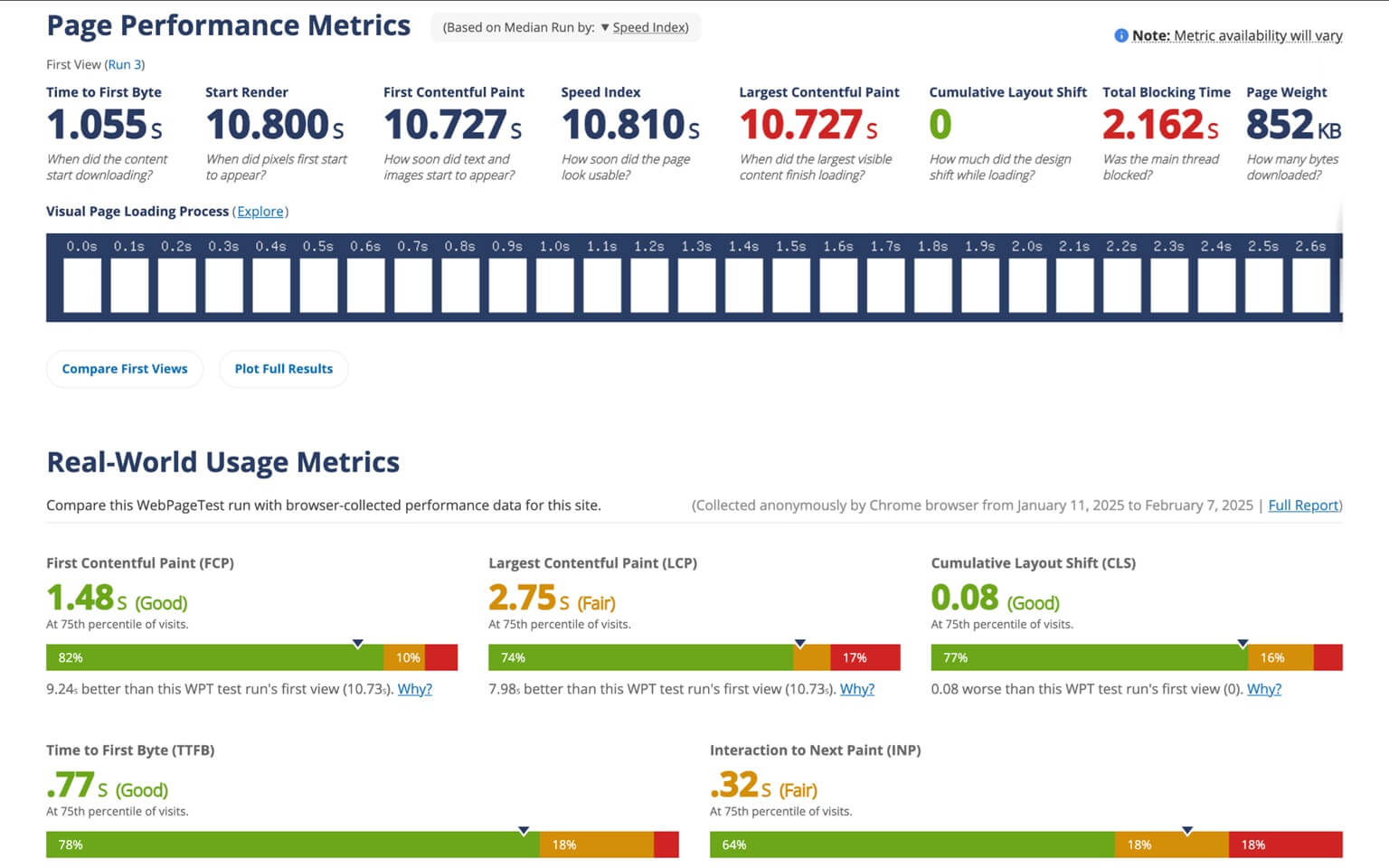
- WebPageTest.org
This service allows you to enter the URL of the app you want to test. It provides many useful metrics that can help you assess and optimize your website's performance.
Final Thoughts
Optimizing JavaScript performance isn’t just about writing cleaner code—it’s about delivering a seamless user experience. By implementing these strategies, you can improve load times, boost user satisfaction, and enhance SEO rankings. Whether you're debugging inefficient loops, leveraging async scripts, or optimizing your CDN setup, every improvement counts toward a faster, more efficient web application.
Speed is no longer a luxury; it’s a necessity. Start optimizing today!