
Video Demo
Here’s how to create the Assistant. We suggest reading the instructions first and then watching the video. At the end, you’ll also find a Kahoot quiz — take it after you go through the material, or jump in right away if you already feel confident.
Why We Choose AWS Bedrock
In a project for a major UK financial company, our product owner pointed out that the existing chatbot was not meeting user expectations. The main issues were clear:
- Inaccurate Search Results: The chatbot frequently returned wrong answers, increasing the workload for the operations team, an issue exacerbated by our growing user base.
- Lack of Context: Despite numerous predefined responses, suggested answers were often irrelevant to users' queries.
- Slow Updates: Our team didn't own the current solution, so even minor changes took weeks or months to implement.
Faced with these challenges, we set out to build a fast, reliable, low-maintenance chatbot that could deliver accurate, context-aware answers.
Lexical Search vs Semantic Search
Lexical search (keyword search) is a traditional method that matches the exact words or phrases in a user query. In its simplest form, it only matches specific keywords without additional processing, focusing on exact matches or close variants within a text. It's the approach used in traditional tools like Elasticsearch or Solr, using techniques such as string similarity, tokenization, and N-gram similarity.
Semantic search takes a step further. It understands the meaning and intent behind queries using ML models (typically neural networks) to encode text into vector embeddings, which reside in a multi-dimensional space. This allows for finding relevant results even if keywords don't precisely match. Semantic search excels at understanding synonyms, meaning, and related concepts.
Semantic search is particularly effective with unstructured data and can even handle formats like images.
Exploring Options: Ollama vs. AWS Bedrock
Option 1: Ollama
For semantic search, we first considered Ollama, an open-source tool for running LLMs locally. It's ideal for organizations prioritizing data control and privacy. By running models locally, you maintain full data ownership and avoid potential security risks associated with cloud storage.
Pros:
- Complete control of the AI model
- Can be deployed via Docker
Cons:
- Higher maintenance costs than cloud services.
- Requires significant infrastructure and personnel for data processing and monitoring.
- Maintaining vector storage is complex.
Given our tight timelines and need for lower maintenance, Ollama wasn't the right fit.
Option 2: AWS Bedrock
We evaluated various cloud services (Azure, Google, and AWS) and ultimately chose AWS Bedrock, taking advantage of our team's existing AWS expertise. It's a fully managed service offering high-performing foundation models (FMs) from leading AI companies like Anthropic, Cohere, DeepSeek, Luma, Meta, Mistral AI, and Amazon through a single API, along with a broad set of capabilities needed to build generative AI applications with security, privacy, and responsible AI.
Alternatives: Azure OpenAI, Google Vertex AI
Pros:
- Fully managed service (no need to dockerize or deploy models internally).
- High performance and compliance standards.
- Rapid development cycles with minimal configuration.
Cons:
- Limited control over the system.
- Vendor lock-in, which makes future migrations to other platforms more complex.
Configuring AWS Bedrock
Server-Side Setup
- Choose a data source
AWS Bedrock supports multiple data sources:
- S3 Buckets: Suitable for static documents or files
- Web Crawler: Can scrape interconnected web pages and pull them into the vector database
- Confluence Pages: Ideal for indexed organization knowledge bases that are frequently being updated
- Set up a vector store
In other words, choose the location to store the data. AWS supports OpenSearch Serverless, which has high performance but is quite expensive. Alternatively, you can use PostgreSQL with vector plugins.
- Select the embedding model
Choose the model carefully, considering what's available in your region. Not all AWS regions support all embedding models due to policies or regulations.
- Sync the data
Simply press the sync button, and all the specified data in the data source will be processed.
Side note: It's not possible to create knowledge bases using the AWS root account. Additional users with Bedrock-specific permissions will need to be created.
Client-Side Options
- In Python, AWS SDK (Boto3) is well-supported and straightforward.
- In Java, there's AWS SDK, but it lacks proper documentation for Bedrock.
- Other Libraries: Explore Spring AI, LangGraph, or LangChain, depending on your needs.
We suggest going with Python. We wanted a simple solution, so we didn't implement a chatbot with history. It's more about retrieving data with some minor augmentation.
Pricing
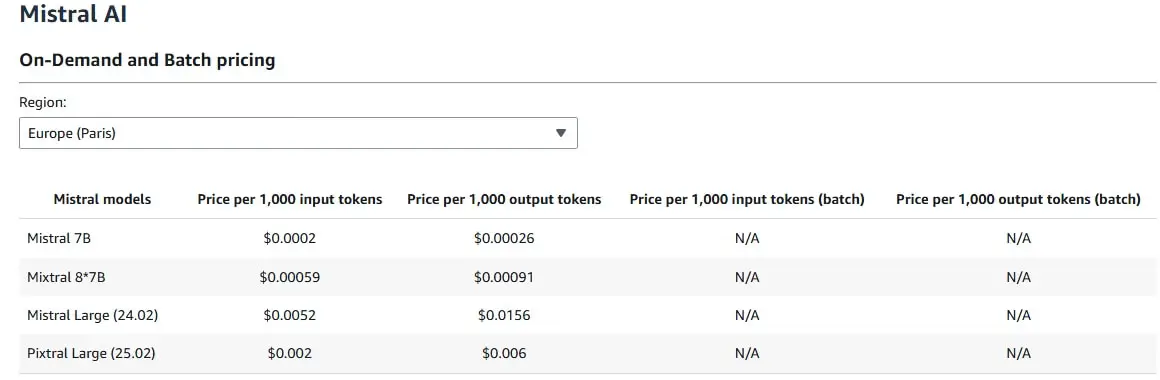
Costs vary based on region and model. For our PoC, we used Mistral 7B, and one month of OpenSearch cost us $100. In the image below, you can see that it's not that expensive for 1000 tokens.
Some companies might prefer to use an alternative to Amazon's default solution, but if it does not matter to you, then choose Amazon's solution.
Next Steps
After completing your AWS Bedrock implementation, follow this guide to enhance its performance:
- Implement safeguards for your application requirements and responsible AI policies with Amazon Bedrock Guardrails.
- Try out alternative vector stores.
- Test different prompts.
- Add chat capabilities and agents.
Quiz
Now, let’s see how much you know about AI assistants!
Conclusion
AWS Bedrock offers an efficient, fully managed path to building AI assistants that deliver relevant, context-aware responses. With careful model selection, structured setup, and ongoing optimization, it’s a strong choice for organizations looking to deploy robust AI systems quickly and with minimal operational overhead.