AI Essentials for Engineers Quiz
Think you know AI inside out? Prove it!
Key Terms to Know
Agentic chat refers to AI-driven conversations where the assistant plans and executes multi-step tasks autonomously, using tools such as web browsing, code execution, or file editing. Many of these capabilities are now integrated into popular IDEs, making them easy to access.
Examples:
- Cursor
- JetBrains AI Chat
- VS Code + GitHub Copilot and GitHub Copilot chat extensions
- Amazon Q
- Claude Code
Chat context is the AI's memory of previous interactions within a conversation. It enables continuity, coherence, and personalization in responses.
Core AI Models: Strengths and Differences
| Model | Company | Strengths |
| GPT 4/5 | Open AI (Microsoft) | Multi-modal Long-context |
| GPT o3/ 5-thinking | Open AI (Microsoft) | Multi-modal Step-by-step reasoning Strong instruction following Agentic |
| Gemini Pro/ Flash | | Multi-modal Large data analysis Multi-lingual |
| Claude | Anthropic (Amazon) | Strong instruction following Agentic Best at coding |
| Grok | xAI | Multi-modal Step-by-step reasoning |
Term explanations:
- Multi-modal: Can process text, images, video, audio, and files. For example, you can give AI a screenshot of your design draft and ask it to create something or compare options.
- Long-context: AI works with the information you provide or by accessing external tools. The more information it can keep in context, the more effective it is.
- Agentic: Operates autonomously to make decisions and perform tasks.
- Step-by-step reasoning: Solves tasks through structured reasoning, leading to better results and giving users insight into how the AI works.
On-Premise/Local models
Some clients prefer to keep their data private and avoid connecting to third parties, so they choose on-premise infrastructure. While these models may be slightly less capable than cloud options, they remain effective for many specialized needs and are supported by major providers like Amazon, Azure, and Google Cloud.
| Model | Company | Size | Strengths |
| LLaMa | Meta | 1-405B | Long-context Multi-modal (images) MoE (fast, cost-effective) |
| GPT-OSS | Open AI | 20-120B | Long-context MoE (fast, cost-effective) Step-by-step reasoning |
| R1/ V3 | DeepSeek | 1-405B | Step-by-step reasoning |
| Gemma | | 1-27B | Good knowledge Multi-modal (images) |
| Qwen 3/ 3-coder | Alibaba | 3-180B | Agentic Good at coding MoE (fast, cost-effective) |
| Phi | Microsoft | 4-42B | Long-context Step-by-step reasoning Multi-modal (images) |
Writing Better Prompts
LLMs behave differently depending on how you interact with them; they perform best when guided by clear, structured prompts. Include the following details:
- Role: Define context to tailor responses and receive relevant results, not generic ones.
Example: As a senior {QA/dev} engineer specialised at {domain}…
- Task: Give a brief explanation of what you want.
Example: Generate boundary tests for parsePrice()
- Context: Explain why you need the information. This helps the AI provide structured results, like tables or bullet points.
Example: I'm researching {topic} and need information on…
- Output: Request a specific format, such as a JSON schema or table.
- Quality Gate: Tell AI what to do and not to do.
Example: If information is missing, list assumptions; do not invent APIs.
- Example: Show expected output.
Example: Return an array of {name, input, expected, rationale}; no prose.
We recommend using one-shot prompting: Instead of chatting until the model gets it right, edit your last message to add missing details (e.g., output format). This keeps your chats clean and organized, making them easy to revisit and use as a knowledge base.
Instructions
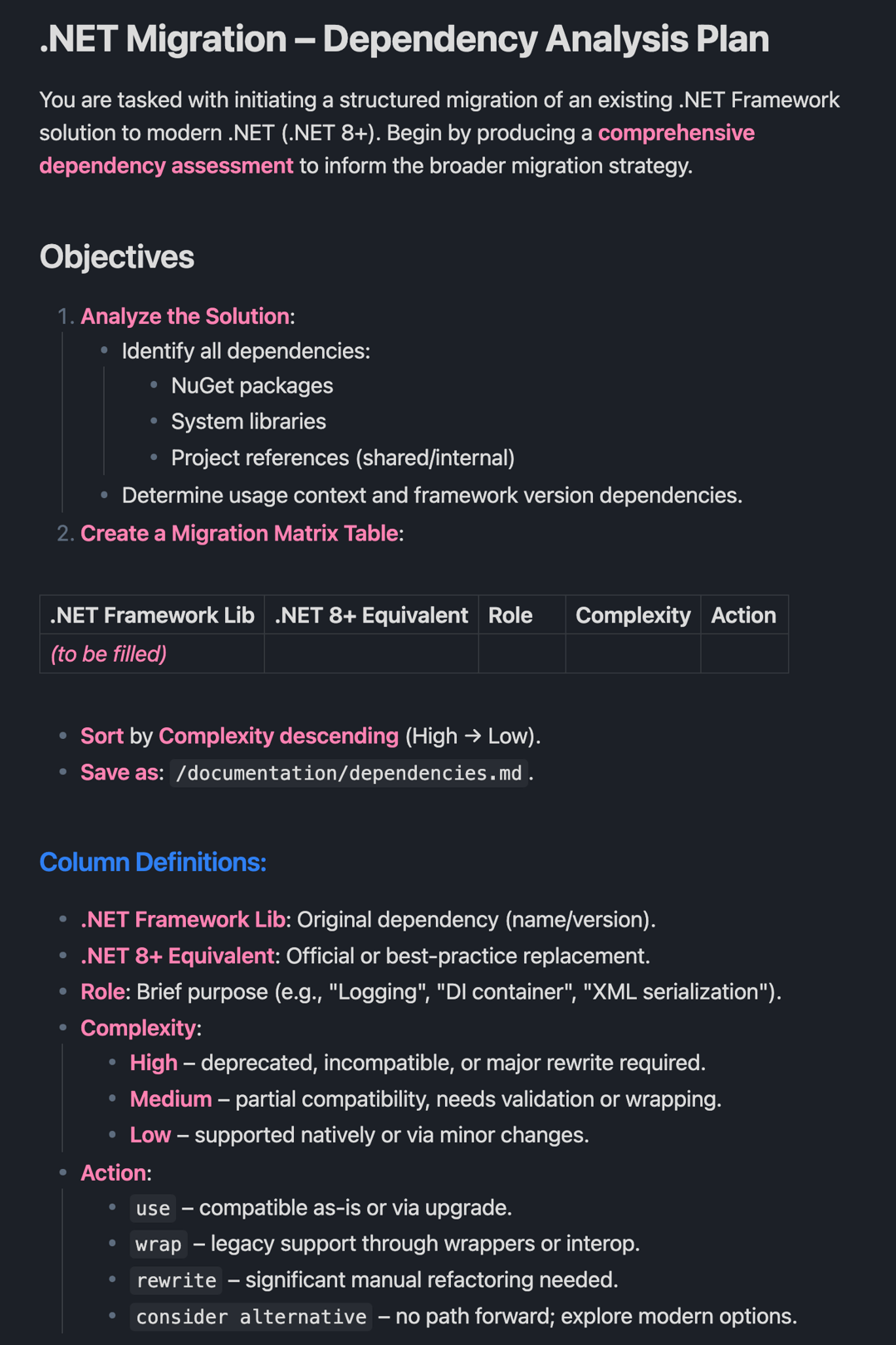
We use instructions when working on a larger scale or when replicating a process with AI. Instructions outline key details about your project, process, or goal. They are brief, self-contained, and easy to share and reuse.
You can also use sub-instructions to break down large processes into smaller steps. At each step, you can add details or bullet points to give the AI better context. Be sure to use Markdown formatting.
Here’s an example of an instruction:
Common use cases:
- Project context
- Repetitive process
- Standardized stack/tools
- Coding conventions
- Security/ Compliance check
- Domain language
Connecting AI to Tools: The MCP Framework
Model Context Protocol (MCP) is an open-source standard that defines how AI systems, like LLMs, connect to and use external tools and data sources. For example, adding Atlassian MCP allows your AI agent to access JIRA and Confluence. Other examples include:
- Playwright MCP
- Mobile MCP
- GitHub MCP
- AWS/ Azure MCP, etc...
How QA Teams Use AI in Practice
AI supports QA teams by automating time-consuming, repetitive tasks and improving accuracy. Key applications include:
- Test execution: AI can optimize and prioritize tests by selecting which ones to run based on changes in the code, past failures, and risk analysis. This speeds up regression testing and reduces unnecessary tests, saving time and resources.
- Requirements verification: AI analyzes documents to ensure they are clear, testable, and consistent. It can also compare requirements to test cases and code to identify gaps or inconsistencies early in the development process.
- Accessibility testing: By analyzing UI components, AI simulates interactions by users with disabilities. It detects issues like missing alt text, poor color contrast, or keyboard navigation problems.
- Test case generation: AI can review requirements, user stories, and code changes to identify test scenarios. This reduces manual effort and increases coverage.
- Page object generation: AI analyzes a page and quickly creates a page object with all locators and necessary methods. This reduces repetitive coding and keeps tests maintainable.
- Auto test generation: AI can create tests by reading test cases, understanding the workflows, etc.
- Self-healing tests: AI identifies UI elements and code changes and fixes broken tests after each run. This helps stabilize test automation, reducing maintenance time and costs.
- Code review, refactoring, and migration: AI can review code for errors, suggest improvements, refactor to improve quality, or migrate scripts between frameworks (for example, from Selenium to Playwright) with minimal human input.
AI Use Cases for Developers & DevOps
Businesses often postpone tasks like code migration or refactoring due to a low perceived business value or high effort. But AI can help address these tasks more efficiently:
- Code migration and refactoring: AI analyzes legacy code and automatically translates it to a new language, library, or framework. It also refactors code for better performance, readability, or maintainability by identifying and fixing code smells or technical debt.
- Unit tests: AI generates new unit tests based on code changes, requirements, or past bugs to improve coverage. It can also update or expand existing tests when the code changes, keeping test suites current and relevant.
- DB queries: AI helps explain what a query does, decodes old code, assists with changes, and suggests improvements based on your requirements. It can write SQL or NoSQL queries from natural language prompts, upgrade outdated queries for performance, and provide plain-language explanations.
- Logs queries: AI filters log files and extracts relevant parts. You can ask AI to summarize logs or find specific information.
- Data research: Use AI to create SQL queries or JavaScript reports that summarize or group information and output results in formats like spreadsheets.
- Ad-hoc tooling: AI quickly generates custom scripts, helper tools, or integrations based on brief descriptions, reducing manual coding and increasing productivity.
- Pipeline updates: Developers often avoid tweaking inline bash scripts or CI pipelines as they typically require DevOps help. AI can suggest and implement small pipeline changes directly.
- Drafts for IaaC charges: For Infrastructure as Code (IaC), AI can create draft templates for tools like Terraform, CloudFormation, or Ansible based on requirements, helping DevOps teams automate infrastructure changes while reducing manual errors.
Getting Started with AI
Understanding the fundamentals of AI helps engineers make better technical and business decisions. Before implementing, identify the tasks to automate and why. Compare model capabilities and choose the one that best fits your needs. Finally, write a precise and structured prompt to get the best results. That’s where practical AI work begins.